
Communities: Give Every Team the Task List They Actually Need.

Off-the-shelf project tools were built for teams, not locations.

Pacer starts from a different premise: every task, every discipline, every department, belongs to one location, one source of truth. Communities decide who's cleared to see what inside it.

Grant someone a Community, and Pacer decides, task by task, what shows up in their view, so user access and task access work as two separate layers.

Structure it around lowest necessary access, and everyone gets exactly what their role requires. Nothing duplicated, and nothing hidden from someone who needs it to do their job.

With Communities, Pacer scales inside your organization instead of being renegotiated every time a new team, project, or department wants in.

What's the difference between Communities and "user access rules?"

Lowest Necessary Access

Give every role exactly what it needs, and nothing more.

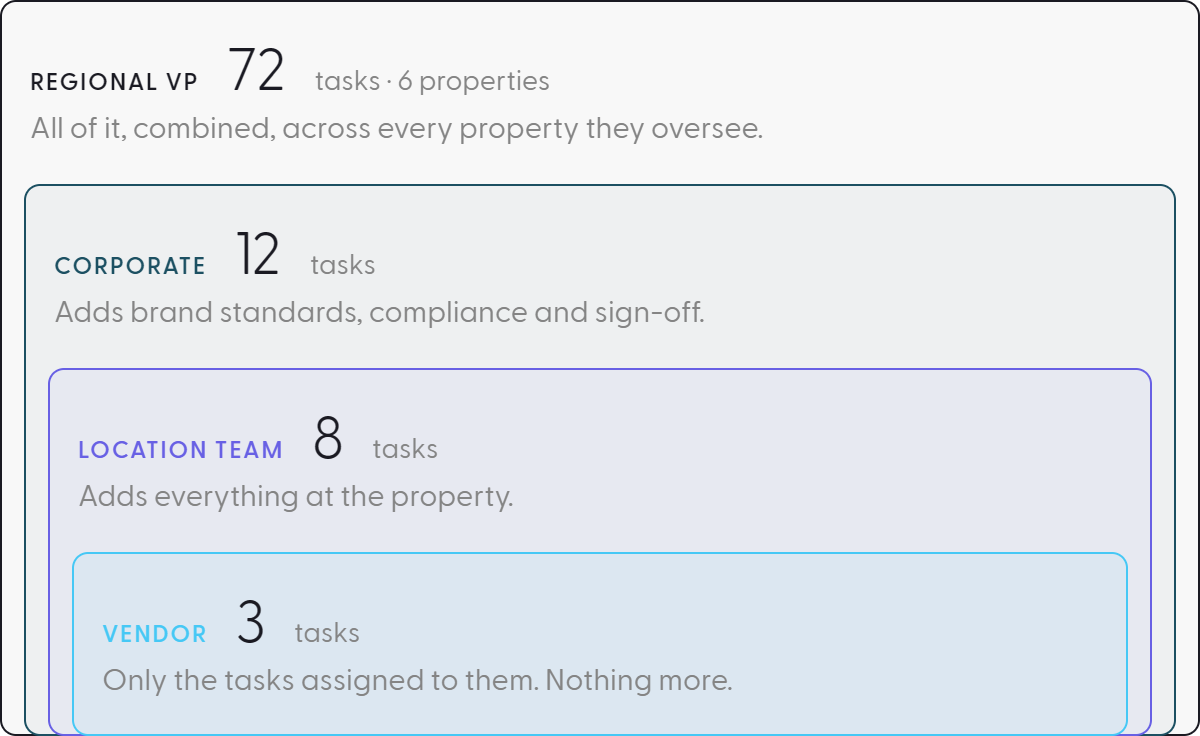
A vendor sees only the tasks assigned to them. The location team sees those same tasks plus everything at the property level, because they need the full on-site picture. Corporate sees vendor tasks, location tasks, and the work that belongs to corporate alone, and a regional VP sees the combined view across every property in their remit.

Each layer inherits what sits below it and adds only what that role alone owns. Nothing duplicated, nothing hidden from someone who needs it to do their job.This is the pattern most customers land on independently.

It's simply how responsibility is already distributed in the field. Access follows the role, not a chart on the wall.

Role-Specific Task Lists

Cut straight across every project a company runs, aligned to a role instead of a project.

One customer set up a Community so only General Managers can see a defined set of training and onboarding tasks, a GM's own learning journey, distinct from the operational tasks their property is executing.

Another built a Community exclusively for their training team, giving that team one dedicated task list across every location without ever needing to be invited into each property's broader project.

Same mechanism, deployed for role clarity instead of task security.

This is how Communities decide who sees which tasks, no matter which axis your organization needs: role, department, project, seniority, or timeline.

Multi-Team Coexistence

Let a company run multiple, unrelated uses of Pacer at once without them colliding.

A new-store-opening team adopts Pacer first. Months later, a completely different team, running an internal audit program, wants to use the same platform for a completely different purpose. Without Communities, this is a turf war: whoever set up the account first controls what everyone else sees.

With Communities, it isn't. The opening team keeps its Communities scoped to opening work. The new team stands up its own, invisible to the first. Two teams, one tenant, zero interference.

This is how Pacer scales inside an organization instead of being renegotiated every time a new department wants in.

Private Projects

Make a fully private project possible without sacrificing the reporting every other project gets.

Not every project is meant for broad visibility. A pending acquisition, a sensitive leadership transition, a pilot program still being tested, these need to exist in the same system as everything else, without living in a separate tool or a locked-down spreadsheet passed by hand.

A Community scoped to a small, named group keeps the reporting, scheduling, and workflow enforcement every other project gets, while limiting who can see it exists.

The location holds one truth. Communities decide who's cleared to see it.

Milestone Reminders

Tie the reminder to the deadline it's counting down to, instead of a calendar entry that goes stale.

An opening manager needs to reach out to a location at 120 days before go-live, again at 90, again at 60. That's traditionally an Outlook reminder, set once and disconnected from the project, and wrong the moment a go-live date shifts.

One customer instead built these as Pacer tasks, visible only to opening managers through a dedicated Community. Because task due dates are tied to each location's own go-live date, the 120/90/60-day cadence recalculates automatically if a date moves.

No reminder to reset, no calendar entry to hunt down. The task lives inside the same system tracking the milestone it's counting down to, visible only to the person accountable for acting on it.

Dashboards That Inherit the Rule

Carry Communities into every Dashboard, every Portfolio Health dashboard, every report.

Most platforms stop at the task list. Open the Portfolio Health dashboard as a corporate executive, and the counts, the summaries, the rollups reflect only what your Community includes. A location manager opens the same overview and sees entirely different numbers, not because Pacer built two dashboards, but because one dashboard adapts to the person looking at it.

No IT ticket, no custom report per role, no dashboard rebuilt every time a new type of user joins the portfolio.

Communities decide the view once. Every future report inherits the rule.

Communities Are Not User Access. They Are Task Access.

User Access controls which locations a person can reach. Communities control which tasks inside that location they're allowed to see. Both operate at once, and both are necessary.

Grant a person one or more Communities, and Pacer decides, task by task, what belongs in their view. Most customers structure this on one principle, lowest necessary access:

  • A vendor sees exactly the handful of tasks assigned to them, nothing more
  • A location team sees those same vendor tasks, plus everything at the property level
  • Corporate sees vendor tasks, location tasks, and the tasks that belong to corporate alone, brand standards, compliance, sign-off
  • A regional VP sees it all, combined, across every property they oversee
  • Nothing is duplicated. Nothing is withheld from someone who needs it to do their job

Unclear access creates the same dysfunction spreadsheets did: a wall around each team's slice of the work.

Communities carry this logic into every Dashboard, every Portfolio Health dashboard, every report, so the location holds one truth and access follows the role, not a chart on the wall.
The Pattern to Avoid: Mirroring the Org Chart

Some customers set up Communities by department: Finance sees only Finance tasks, HR sees only HR tasks, and neither sees the other's. It's a tempting default because it's familiar, it's how the org chart already looks.

It's also the wrong instinct, and here's why:

  • Departmental silos solve visibility the same way spreadsheets did, by walling off each team's slice of the project
  • Finance can't see how a delayed vendor task pushes its own deadline
  • Every department gets its own island instead of a shared view of the project
  • That's the exact dysfunction most customers came to Pacer to escape
  • We support this configuration. We don't recommend it, and we tell customers so directly

When you’re rolling out projects across multiple locations, these gaps slow teams down and introduce risk at every step.

A project succeeds when every discipline can see how its timeline affects the others, not when each department is fenced off with its own private list. Structure Communities around lowest necessary access, not around your departments.

Standardize the Work. Restrict the View.

Off-the-shelf tools force a choice: one board for the whole team, or a workaround for every exception corporate needs.

Split the board to handle vendors, sensitive projects, or department needs, and you split the location. Tasks that belong together scatter across disconnected trackers.

Reporting breaks, because no single view contains a location's true status.
Pacer starts from a different premise: every task belongs to a location, and Communities decide who's cleared to see which piece of it.

No IT ticket. No custom report per role. No dashboard rebuilt every time a new type of user joins the portfolio.

Communities decide the view once. Every future report inherits the rule.

Talk to an Expert