
Project Control Hub: Simplify Your Project Creation and Management.

Take control of every project from the moment it starts.

The Project Control Hub (PCH) gives you one clear place to plan, assign, and launch projects across your organization. You decide which teams or locations are responsible, set expectations up front, and ensure every project starts and finishes on the required timeline.

Create projects once, then publish them where they need to go. Each location sees only what matters to them, so teams stay focused and accountable.

Define the work with tasks and baselines. Set a precise zero date for every location so execution stays consistent, no matter how many teams are involved.

With Pacer's Project Control Hub, you’re not chasing updates or piecing together progress. You’re setting the standard, rolling it out with confidence, and keeping every project aligned from day one.

Dashboard showing Brand Standard Audit with task milestone completion chart, certified completions, coach assignments, and a list of locations with status and managers.

Launch and manage complex projects across your portfolio without endless meetings, emails, and texts.

Locations + Teams

Focus every project on the right people from the start.

The Locations + Teams view gives you a clear picture of who is responsible and who is in scope so nothing falls through the cracks. You can quickly decide where the project applies, align the right teams, and make sure each location knows exactly what they own.

As your project evolves, you can adjust scope with confidence. Add or update locations in moments and keep everything aligned without creating confusion or rework. When you need to make changes at scale, you can apply them across many locations at once, saving time and keeping execution consistent.

This is where you turn strategy into coverage. Every location is accounted for. Every team has clarity. And you stay in control of how your projects roll out across the business.

Task Lists

Give every location exactly the work they need to succeed.

The Task Lists view is where you define what great execution looks like. You set clear, repeatable expectations through structured tasks, so every team knows what to do and when to do it.

Baselines let you tailor that experience without losing control. Build a core set of tasks for the broader project, then layer in additional work for specific locations or teams that need it. Whether you are supporting different brands, regions, or levels of complexity, you can deliver the right plan to the right group every time.

When you are ready to launch, you can assign the appropriate baseline to each location with confidence. No overloading teams with unnecessary work. No gaps in execution.

This is how you turn a single project into a scalable, consistent rollout. Clear expectations, tailored where it matters, and aligned across every location.

Project Files

Stay in control of every submission without chasing updates.

The Project Files view gives you a complete, real-time record of what teams are turning in across every location. No digging through tasks or tracking down uploads. Everything is in one place, ready for review.

You can quickly approve work, request changes, or assign someone else to review, so nothing stalls and quality stays high. When it’s time to audit or report, you can pull everything at once and move fast.

This is your command center for accountability. You see what’s done, what needs attention, and where to step in, so every location delivers work that meets your standards.

Waiver Requests

Keep projects moving forward without losing control.

The Waiver Requests view gives teams a clear, structured way to raise their hand when a project does not apply to them. Instead of side conversations and uncertainty, you get visibility into every request in one place.

You stay in charge of the decision. Review each request, approve when it makes sense, or hold the line when standards need to be met. Every choice is tracked, so there is clarity and accountability across the organization.

This protects both speed and integrity. Teams are not blocked by work that does not fit their reality, and you maintain consistent oversight across every location.

Project Support

Get answers fast without losing control of the project.

Project Support gives every team a clear path to ask questions and get help, all in the context of the project they’re working on. No side emails. No scattered conversations. Every request is captured, tracked, and handled in one place.

Admins stay connected to what’s happening in the field. See where teams are getting stuck, respond quickly, and keep work moving without delays. Support requests go directly to the right contact, so nothing gets lost or overlooked.

This keeps your projects running smoothly at scale. Teams feel supported, issues are resolved faster, and you maintain full visibility into where your attention is needed most.

Project Details

Set the foundation for every project with clarity and control.

Project Details is where you define the key information that keeps your project organized, aligned, and easy to manage at scale. From naming and ownership to timelines and resources, everything important lives in one place.

Assign the right support contact and implementation manager so teams always know who to turn to. Set your zero date to anchor execution and keep every location on the same timeline. Use tags and resources to provide context and guidance without cluttering the work itself.

This is where your project takes shape. Clear structure upfront means fewer questions later, smoother execution across teams, and complete confidence that everyone is working from the same playbook.

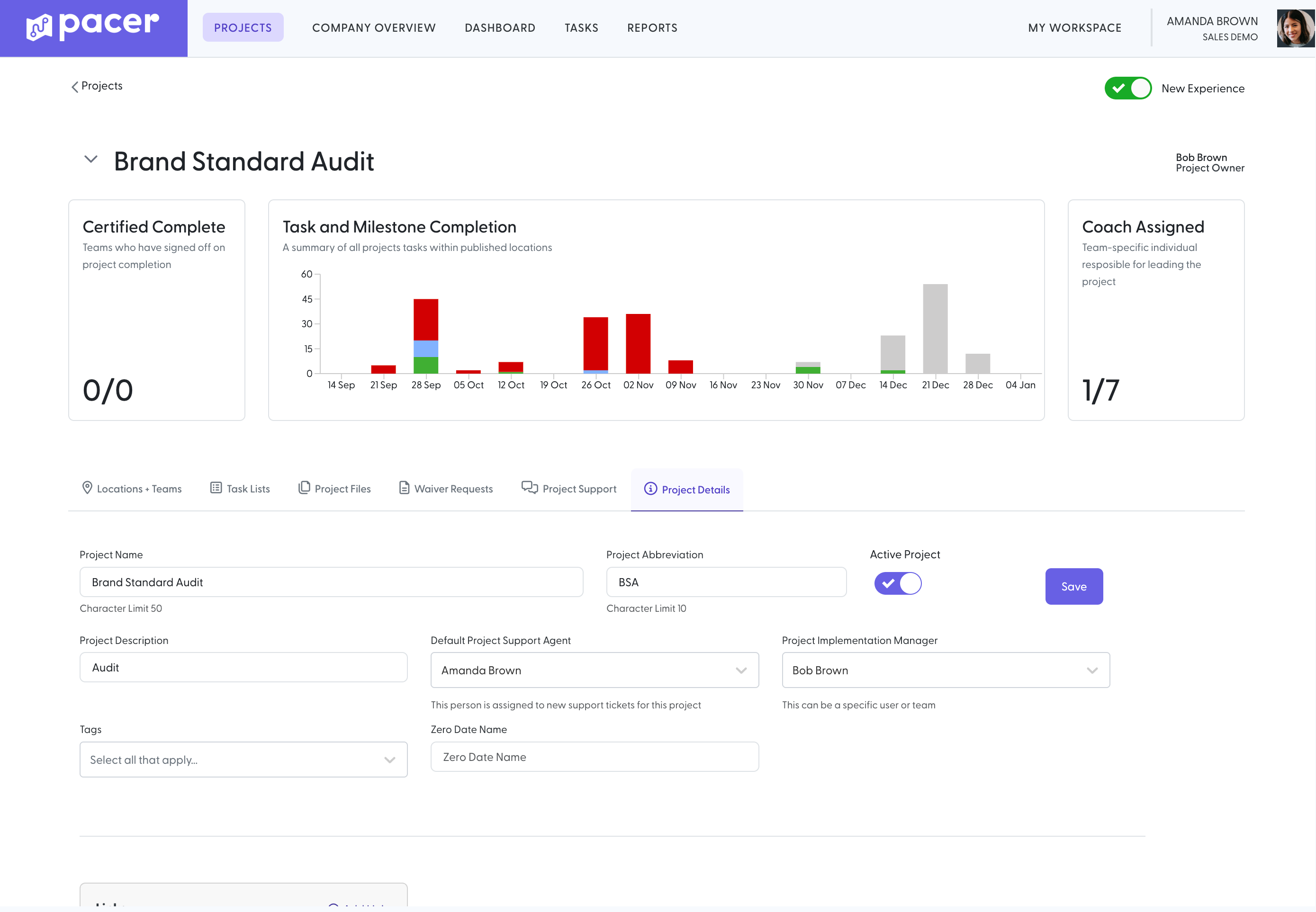
Project dashboard for Brand Standard Audit showing task and milestone completion chart and project details fields with active project toggle enabled.

Replace spreadsheets and emails with collaborative dashboards.

Emails and spreadsheets create disconnects. They scatter communication, hide accountability, and make it hard to see what’s really happening across your projects.

Disconnected tools can’t manage:

  • Which locations are truly in scope and responsible for delivery
  • How different teams need tailored versions of the same project
  • When each location should start to stay aligned on timelines
  • Whether work has been completed and meets your standards
  • How questions, exceptions, and updates impact execution

When you’re rolling out projects across multiple locations, these gaps slow teams down and introduce risk at every step.

The Project Control Hub brings everything into one place. You define the plan, assign ownership, and give every team a clear path forward. Everyone works from the same source of truth, so projects move faster, stay consistent, and finish with confidence.
Replace spreadsheets and emails with collaborative dashboards.

Emails and spreadsheets create disconnects. They scatter communication, hide accountability, and make it hard to see what’s really happening across your projects.

Disconnected tools can’t manage:

  • Which locations are truly in scope and responsible for delivery
  • How different teams need tailored versions of the same project
  • When each location should start to stay aligned on timelines
  • Whether work has been completed and meets your standards
  • How questions, exceptions, and updates impact execution

When you’re rolling out projects across multiple locations, these gaps slow teams down and introduce risk at every step.

The Project Control Hub brings everything into one place. You define the plan, assign ownership, and give every team a clear path forward. Everyone works from the same source of truth, so projects move faster, stay consistent, and finish with confidence.

A screenshot of Pacer's Health Score and Risk Score dashboard

Automate project performance tracking without hours of setup work.

Spreadsheets and traditional PM tools force you to build reports from scratch just to know where your teams stand.

Tracking progress across locations means pulling data, updating slides, and piecing together status by hand.

And when visibility is unclear, the busywork starts.
Chasing updates. Getting status updates in the middle of project standup meetings. Following up on emails from weeks ago.

The Project Control Hub replaces all of it with a live, shared view of execution. You see progress, gaps, and accountability in real time, without the manual effort.

Less time reporting. Less time chasing. More time actually driving the project forward.

Talk to an Expert