
Task Financials: the task tells you what happened. Your spreadsheet is supposed to tell you what it cost.

They've never been the same record. Every project has a shadow ledger. A budget spreadsheet, built by whoever set up the project, tracking what was allocated and what got spent, pulled up in a different window, updated by a different person, on a different schedule than the work it is supposed to be tracking.
‍
A task closes out in Pacer showing "Complete." The spreadsheet, three tabs deep, is the only place that shows it came in $1,200 under budget, or $4,000 over. And the moment that data needs to reach the people who actually did the work (a GM, a location team, a franchisee), the file becomes a liability instead of a record. Share the whole thing, and everyone sees every number, including the ones they were never supposed to see. Rebuild a redacted version per location, and someone is now maintaining dozens of near identical files by hand, every time a number changes.

Pacer puts the money on the task.

Budget and actual sit next to the work they describe, so there is no file to maintain.

One task. One budget. One actual. No file to maintain.

Line items

Every task in Pacer can carry a budget and an actual spend, entered as line items: vendor, vendor item number, quantity ordered, unit price. It is the same level of detail a spreadsheet was built to hold, attached to the exact task the money was spent on and visible to exactly who is supposed to see it. No separate file, no redacted copy, no version to keep in sync.

Receipts

Need the receipt on record? Attach it to the task directly. The invoice lives next to the work it paid for.

Variance

Pacer calculates variance the moment budget and actual are both on the record, and recalculates it the instant either one changes. No PM has to work it out at month end, in a file, by hand.

VAT, handled once, per location.

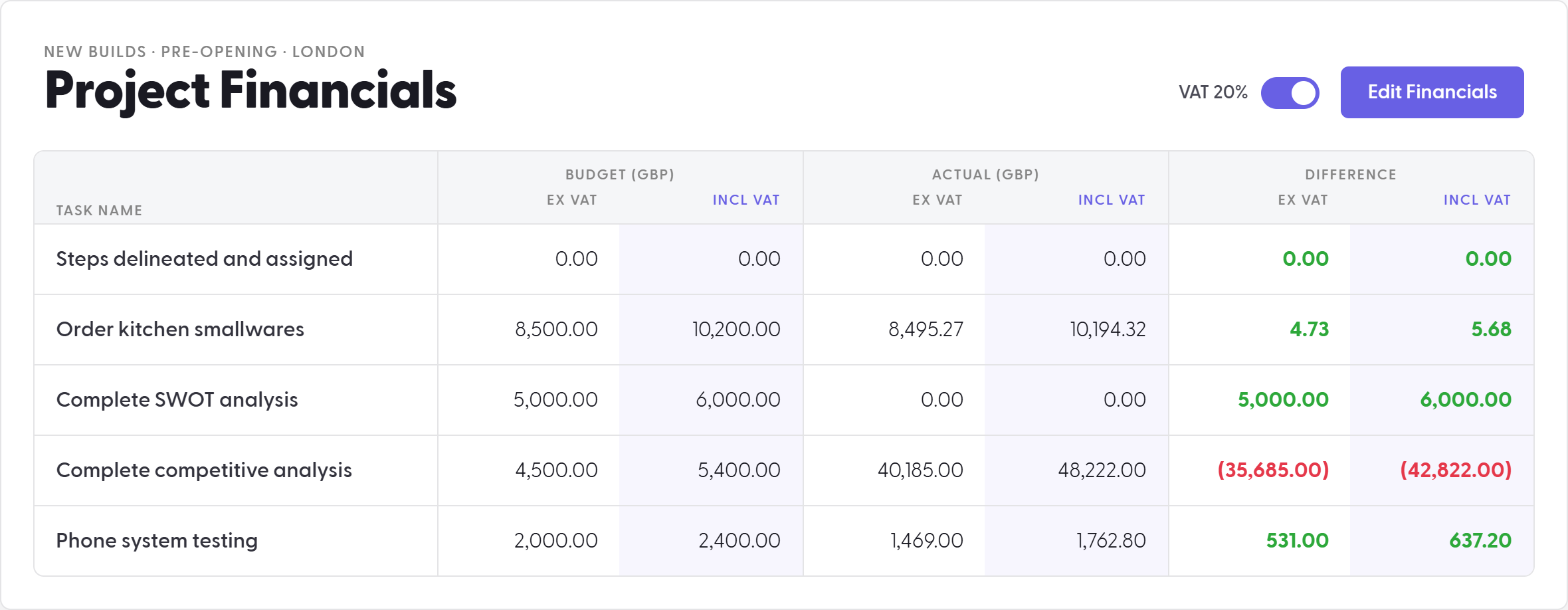
Set a VAT percentage at the location level and Pacer runs the math for you. Budget, Actual, and Difference each show with and without VAT, side by side. Toggle it off for locations where it does not apply. There is no parallel spreadsheet to keep your VAT and non VAT totals from drifting apart.
Change Orders

Scope changed? The task changes with it, and keeps its own ledger.

Change orders don't belong in a separate approval thread, chasing down a signature disconnected from the work they modify. In Pacer, a change order is a task: copied from the original, tagged as a change order, and given its own budget and actual from the moment it is created.

The scope change is on the record the same way the original task was: owned, dated, priced, and tied to the location it affects. Nothing about it lives in a different system than the project it changed.

Permissions

Everyone sees the plan. Only the right person changes it.

Financials in Pacer runs on a permission split that separates who executes from who sets the plan, so nothing is hidden from the people doing the work.

  • Task doers, the people actually doing the work and logging what it cost, see the full Financials page for their location. Budget, actual, variance, all of it, in the open. They can enter actuals. They can't touch the budget number itself.
  • Budget editing is a designated permission, set per user by an administrator. It sits outside task assignment and Community membership: a direct control over who is allowed to set the plan, independent of who is allowed to execute against it.

The result: nobody is working from a partial picture, and nobody is quietly editing the number everyone else is being held to.

Variance

The number that tells you what to do next.

A spreadsheet shows you variance after the fact, as a closeout artifact reviewed once the project is already finished and the money is already spent. In Pacer, variance shows up while the project is still running, on the task, the moment it is calculated.

That changes what the number is for. A task comes in a thousand dollars under budget, and the PM can decide what that thousand dollars buys next: better fixtures, an upgraded finish, the vendor you couldn't justify at full price. Underspend becomes a decision, and it works because the number is visible the moment it exists, not the quarter after.

Precision at every location. Nothing left to reconcile.

Task Financials runs location by location, with the same location level control you already use for Baselines, Dashboards, and everything else Pacer builds around a location. Budget is set fresh per location once a project publishes there, and variance rolls up on that location's Dashboard. Learn more about Living Projects.